
Download NextCloud Files – Secure Cloud Storage Solution
Overview of NextCloud Files
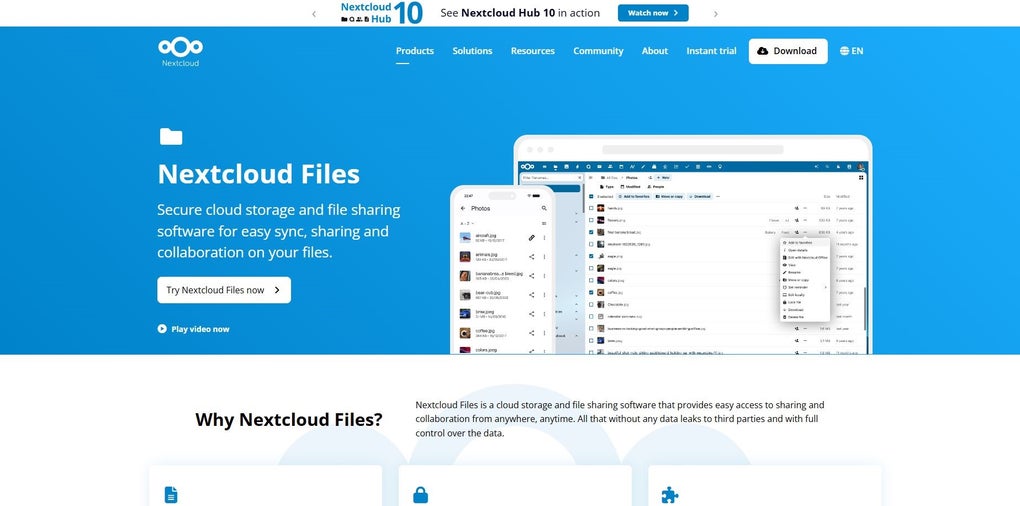
NextCloud Files is a powerful, self‑hosted cloud storage and file‑sharing platform that puts data ownership back into the hands of the user. Unlike public SaaS alternatives, NextCloud runs on your own server or trusted hosting provider, giving you full control over encryption, access policies, and data residency. The modern web interface works smoothly on any browser, while native desktop clients for Windows, macOS, and Linux keep local folders synchronized in real time.
Mobile apps for Android and iOS extend the experience to smartphones and tablets, allowing you to capture, upload, and share files on the go. Whether you are an individual looking for a private photo vault or a business seeking a collaborative workspace, NextCloud Files delivers a flexible, secure, and cost‑effective solution. Its emphasis on end‑to‑end encryption, rule‑based file access control, and strong password policies ensures that files remain safe from unauthorized eyes, ransomware, and brute‑force attacks.
The platform also supports seamless integration with existing data sources such as FTP servers, Windows Network Drives, and Microsoft SharePoint, reducing migration headaches and operational overhead.
Key Features that Differentiate NextCloud Files
- End‑to‑End Encryption: Files are encrypted on the client side before they ever leave your device, guaranteeing that only you and authorized collaborators can read the content.
- Rule‑Based File Access Control (FACL): Create granular policies based on user groups, file types, or network locations to automate permission management.
- Real‑Time Collaboration: Integrated document editing, comment threads, and activity feeds let teams co‑author files without leaving the platform.
- Cross‑Platform Sync: Desktop clients for Windows, macOS, and Linux, plus mobile apps for Android and iOS, keep your data synchronized across all devices.
- Secure Sharing Links: Generate password‑protected, expiration‑aware sharing URLs that can be revoked at any moment.
- Ransomware Protection: Automatic detection of suspicious file changes and versioned backups help you recover quickly from attacks.
- Third‑Party Integration: Connect to FTP, SMB/CIFS, and SharePoint sources, as well as external authentication providers like LDAP, SAML, and OAuth.
- Extensible App Store: Add calendars, contacts, video calls, and other productivity tools from the official NextCloud Marketplace.
- Audit & Compliance Logs: Detailed logs of file accesses, sharing actions, and admin changes support regulatory requirements.
- Open‑Source Community: Continuous contributions from a global developer community ensure rapid security patches and feature enhancements.
The feature set is designed to address the needs of both personal users and enterprises. For example, the versioning system lets you revert to previous file states, a crucial capability for legal teams handling sensitive contracts. Meanwhile, the built‑in workflow engine can automate approval processes, freeing up staff time. All of these capabilities are delivered under a free‑to‑download license, with optional paid support plans for organizations that require dedicated SLA guarantees.
Installation, Usage, and Compatibility
Getting Started: Installation Steps
Installing NextCloud Files begins with selecting a hosting environment that meets the minimum requirements: a Linux server (Ubuntu 20.04 LTS or newer is recommended), PHP 8.0+, a supported database (MariaDB, MySQL, or PostgreSQL), and a web server such as Apache or Nginx. The official installation guide provides a one‑click script for Ubuntu, which automates the download of the latest stable release, configures the web server, and sets up the database. For Docker enthusiasts, the official NextCloud Docker image simplifies deployment to a single docker run command, handling all dependencies internally. After the core server is up, you can log in with the default admin account, create additional user groups, and configure storage back‑ends from the admin panel.
Desktop and Mobile Clients
Once the server is running, download the desktop client for your operating system. The Windows client installs as a standard .exe, creating a virtual drive that mirrors the cloud folder. macOS users receive a .dmg package that integrates with Finder, while Linux distributions provide .deb or .rpm packages via official repositories. After installation, sign in with your server URL and credentials; the client will ask which local folders you wish to sync. The mobile apps for Android and iOS are available on Google Play and the Apple App Store, respectively. After authenticating, you can enable background sync, camera upload, and selective folder access to conserve mobile data.
Supported Operating Systems
- Server: Ubuntu, Debian, CentOS, Red Hat, openSUSE, and any distribution that supports PHP 8.x.
- Desktop: Windows 10/11, macOS 10.15+ (Catalina and later), major Linux distributions (Ubuntu, Fedora, Arch, etc.).
- Mobile: Android 9+ and iOS 13+.
The broad compatibility ensures that teams with mixed device ecosystems can collaborate without friction. Additionally, NextCloud’s web interface works in all modern browsers—Chrome, Edge, Firefox, Safari—so users on unsupported platforms can still access files via a secure HTTPS connection.
Pros, Cons, Frequently Asked Questions, and Final Thoughts
Pros and Cons
- Pros:
- Full data ownership and on‑premise control.
- Robust security features including encryption and ransomware protection.
- Extensive cross‑platform support (Windows, macOS, Linux, Android, iOS).
- Rich integration options with existing file servers and cloud services.
- Active open‑source community delivering regular updates.
- Free core application with optional paid support for enterprises.
- Cons:
- Initial setup requires technical knowledge (server provisioning, SSL certificates).
- Performance depends on the underlying hardware and network bandwidth.
- Advanced features (e.g., enterprise file firewall) may need paid apps.
- Mobile apps, while functional, lack some of the polish of mainstream commercial solutions.
FAQ – Your Questions Answered
Is NextCloud Files really free?
The core NextCloud Files application is open source and can be downloaded, installed, and used at no cost. Optional enterprise‑grade apps and professional support plans are available for a fee.
Can I sync files between Windows and macOS simultaneously?
Yes. The desktop client runs natively on both Windows and macOS, and any changes made on one platform are propagated in real time to the other through the server.
How does encryption work in NextCloud Files?
NextCloud supports both server‑side encryption (AES‑256) and client‑side end‑to‑end encryption via the “End‑to‑End Encryption” app. When enabled, files are encrypted before they leave the client device, and only authorized users possessing the decryption keys can read them.
Can I integrate NextCloud with an existing LDAP directory?
Absolutely. The LDAP/AD integration app allows you to import users and groups directly from your directory service, simplifying user management and single‑sign‑on.
What backup options are available?
NextCloud includes built‑in file versioning and can be paired with external backup solutions (rsync, Borg, or commercial NAS devices). The “External Storage” app also lets you mirror data to secondary cloud providers for redundancy.
Conclusion – Should You Download NextCloud Files?
If you value privacy, control, and a feature‑rich collaboration environment, NextCloud Files stands out as one of the most comprehensive self‑hosted cloud solutions on the market. Its blend of enterprise‑grade security, cross‑platform sync, and open‑source flexibility makes it suitable for freelancers, small teams, and large corporations alike. While the initial setup may demand a modest amount of technical effort, the long‑term benefits—zero vendor lock‑in, customizable workflows, and robust data protection—far outweigh the learning curve. Ready to take back ownership of your files? Download NextCloud Files now and start building a secure, collaborative workspace tailored to your needs.



.png)



